Literature review using AI tools

Chapter 6
  • Aleksandra Bordunos
    Author
  • Anna Sytnik
    Author
  • Aleksandra Bordunos
    Author
  • Anna Sytnik
    Author
In this chapter, we examine the main obstacles that can diminish the enjoyment of the literature review process and ways to overcome them. We show how modern AI assistants can be used to conduct literature reviews quickly and effectively. We will analyse key roadmaps and follow the proposed routes without skipping a single step.
/01

Literature review with AI: review methods and search for keys

/ STEP 1

Searching for keys

The first barrier awaiting novice researchers appears right at the very beginning of the journey. To open the doors to a literature review, one needs to know the keys. But if a researcher is only at the start of the path, how can these keys be identified?
Keys — are the terms by which information sources are selected.
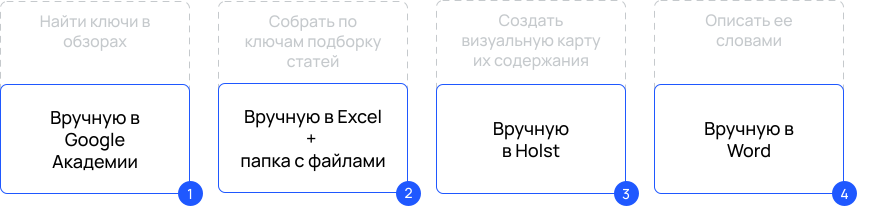
Workflow for a literature review

/Before the emergence of AI-tools

Previously, before starting a literature review, scholars could turn to Google Scholar and, through trial and error, select keys, keeping in mind that the search should be conducted only among recent review articles—preferably from the last 3−5 years.
Example of searching for keys in Google Scholar
The first search began with familiarization with the research domain. At this stage, it was important to pay attention to:
  • key terms and their definitions;
  • authors who introduced the relevant concepts;
  • researchers who proposed scales for their measurement;
  • theories and frameworks that became most popular in the field;
  • authors most frequently cited in reference lists;
  • journals that appeared most often in those lists;
  • the chosen context: what specific features of the phenomenon under study are related to the industry, country, or socio-demographic characteristics of the sample.
Next, after identifying key authors, researchers searched for their earliest articles on the topic, which became the "seeds" for forming an entire tree of subsequent studies — their seeding paper.
In Google Scholar, one could:
  • save found articles in the My Library section, assigning labels for easier navigation, or download sources to a local device;
  • navigate to articles that cited the selected source;
  • subscribe to new citations using the Create alert function;
  • browse the Related articles section;
  • visit authors’ profiles and view their latest publications;
  • дополнить базовый функционал с помощью плагинов, например, для определения уровня публикаций (Q1-Q4).

Example of the classical literature review approach using Google Scholar
As a result of reviewing published literature reviews, it was possible to obtain a concise overview of academic debates—where scholars agreed and where controversial issues and blind spots remained. This helped identify which aspects were most relevant in order to later justify the significance of one’s own research.
It is not advisable to rely entirely on others' reviews. It is important to select empirical studies and draw your own conclusions in line with the chosen research goal and objectives. This helps reduce the risk of bias. For the researcher, the entire process should be as transparent as possible—and ideally, this transparency should be conveyed to the reader.
  • Tip

    When reading literature reviews, choose an example you would like to emulate when writing your own review. You may borrow structure, introductory phrases, and visualization examples. From the outset, it is important to focus only on highly ranked publications.
Tip
When reading literature reviews, choose an example you would like to emulate when writing your own review. You may borrow structure, introductory phrases, and visualization examples. From the outset, it is important to focus only on highly ranked publications.
A library with functionality similar to Google Scholar is eLibrary. For example, it also includes AI-based article search features—such as Find related publications by topic.
In recent years, the following libraries have also gained popularity:
To organize results, researchers actively used special mind-mapping tools such  Miro, Sboard and Holst, as well as dedicated applications including XMind, MindMeister, Draw.io, Lucidchart, Ayoa, MyMap.AI, EdrawMind, many of which now incorporate AI technologies. These tools made it possible to visualize the structure of the narration. The verbal description of these mind-maps, grown from seeding articles, constitutes the core of a literature review.
Workflow for a literature review without AI
Below is an example of key authors and keywords for digital diplomacy.

/After the emergence of AI-tools

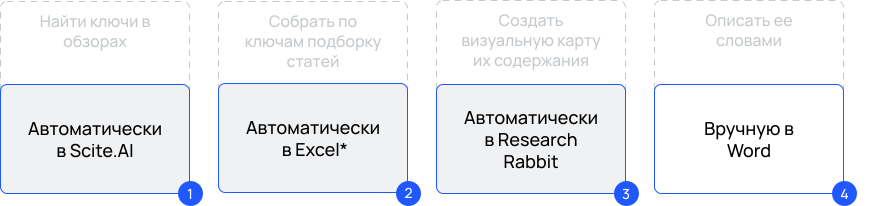
AI-tools have significantly simplified the task of the first step—finding the necessary keys.
The Scite.AI assistant compiles a unique literature review for a given query, offering links to the sources from which it draws key findings and conclusions. To make it convenient for users to verify each statement, it highlights the exact location in the cited document.
The tool also has a browser plugin that allows users to track the quality of publications and their stance—supporting, neutral, or disputing—directly in Google Scholar. The plugin makes it possible to highlight any phrase or question in a text while viewing it in a browser and ask the Scite. AI assistant what answers exist in the available research.
Such platforms have an advantage: unlike Google Scholar, they allow search results to be saved in tabular format. All comments can then be added directly within the saved table. If there are difficulties opening files with the .csv extension, an AI assistant such as TinyWow can be used.
Example of working with Scite.AI
There is also another AI platform that asks you questions to help formulate a correct search query — Undermind. The diagram below shows an example of keyword selection. The purple frame contains the final query, and below it is a fragment of the dialogue that helped clarify whether all nuances were taken into account in the formulation. In a similar way, one can discuss the collected results and conclusions obtained in response to such a query with an AI assistant. This approach allows researchers to obtain both keys and a curated set of articles at the same time.
Example of working with Undermind
List of other similar AI assistants:
    • important

    It is necessary to approach work with such services consciously—do not copy the text of the proposed review, but use them only to identify key terms. Do not forget the "black box" problem associated with AI.
  • important
It is necessary to approach work with such services consciously—do not copy the text of the proposed review, but use them only to identify key terms. Do not forget the "black box" problem associated with AI.
Instead of a mind map, the collected corpus can be transferred to AI-based mapping tools such as Litmaps, Research Rabbit, Connected Papers, Inciteful, СitationGecko, Microsoft Academic. Drawing conclusions based on the resulting literature list — including abstracts — can be assisted by AI tools such as  Powerdrill or any other GPT that accepts documents. Ideally, such a tool should also have internet access (RAG — retrieved augmented generation), like Yandex Neuro, DeepSeek or Perplexity.
Дорожная карта для обзора литературы с ИИ

*на втором шаге по-прежнему остается актуальной выгрузка полных версий статей вручную

Publication quality

When searching for keywords, it is important to focus on the quality of sources from the outset. Most often, we select articles only from peer-reviewed, highly ranked journals. A more precise quality labeling than that offered by Scite. AI is provided by the browser plugin Scientific Journal Ranking. In it, you can configure the rankings that are most relevant in your field of research. A commonly used ranking is Scientific Journal Ranking. Each journal can be checked manually on the SJR website, or you can download the current list of journals and ask AI, Python, or R to indicate the publication level within your dataset. Rapid Journal Quality Check.
At the keyword-search stage, when no curated list exists yet, this plugin can already place labels in Google Scholar search results, allowing you to initially focus only on publications from highly ranked, peer-reviewed journals. In this example, ranking is measured on the Q1-Q4 scale, where Q1 represents the highest level.
Example of checking publication quality using Rapid Journal Quality Check
Installed browser plugins can slow down performance, so it is better to use a separate Google account for research in Google Chrome, or a Yandex account in the Yandex browser with neural networks—and to log out after finishing active work, thereby disabling all plugins. These same accounts often serve as access keys to many AI assistants, eliminating the need to create a separate password for each service.

Ask the neural network…

  • Researcher
    example prompt
    What is the syntax of Google Scholar? Use "digital diplomacy" and "social media" as examples.
  • Perplexity
    Basic search operators:
    1. Exact phrases: To find an exact phrase, enclose it in quotation marks.
    Example: "digital diplomacy"
    2. Boolean operators:
    • AND: Used to find documents containing all specified terms.
Example: "digital diplomacy" AND "social media"
    • OR: Used to find documents containing at least one of the specified terms.
Example: "digital diplomacy" OR "social media"
    • NOT: Used to exclude specific terms from results.
Example: "social media" NOT "VKontakte"
    Full answer
/ STEP 2

Choosing an appropriate review method

There are many methods for conducting a literature review. When choosing a review method, it is important to consider the following parameters:
  • research goals and objectives;
  • the novelty of the research field: how easy it is to read and comprehend the entire body of published articles;
  • the preferences of the academic community in the chosen area.

Four literature review methods

  • Narrative review
  • Systematic review
  • Scoping review 
  • Bibliometric review
  • Narrative review
  • Systematic review
  • Scoping review 
  • Bibliometric review
To facilitate the selection process, you can use neural networks and ask them to compile a comparative table for the four literature review methods: narrative, systematic, bibliometric, and scoping review.
The comparative table of the four literature review methods
Source: query result in Perplexity
Next, we will examine in detail how artificial intelligence can enhance the effectiveness of working with the four literature review methods.
/02

Tools for the narrative review

Most modern AI assistants are designed primarily to support the narrative review method. This method allows researchers to present the chosen research storyline in a well-argued manner. It assumes that key terms are explained first, followed by the presentation of a theoretical framework—that is, which theory best explains the concepts under study and the relationships between them
The theoretical framework makes it possible to formulate hypotheses or theoretical assumptions that will later be tested through empirical validation, and to select examples of prior studies that reinforce the relevance of such preliminary claims. The existence of disagreements is not concealed, as it also enhances the relevance of the research: otherwise, why test what has already been proven? Even so, a study may remain relevant if:
  • Previous studies were conducted in a different context (another region, sector, sample with different socio-demographic characteristics, or at a different time);
  • Previous studies used different methods or measurement scales (typically, research begins with qualitative methods and later shifts to quantitative ones);
  • Previous studies relied on a different empirical model or theoretical framework (different control variables, antecedents, moderators, or mediators, etc.).
The structure of a narrative review follows the classical IMRaD article format:
This structure is also useful to remember for rapid article screening: first, look for answers to the same four questions—what is the goal (I), what methods are used (M), what are the results (R), and what is discussed (D). If the article is suitable, set it aside for further work and make a note in your records; if not, move on to the next one. Most often, answers to these four questions can already be found in the abstract; if not, you can quickly scroll through the full text to the relevant section.

Working with information

One of the major frustrations of novice researchers after identifying keywords is the feeling that nothing is clear. It may seem that experienced scholars deliberately hide meaning behind complex constructions to prevent new competitors from entering their field. This is, of course, not the case — scientific writing style simply requires acclimatisation. There is a wide range of assistants that facilitate not only searching, but also understanding what has been found.
Assistants for working with information:
Example of working with Consensus.app
You can also install a plugin for Google Scholar— Google Scholar PDF Reader. If you find a PDF version of a file in Google Scholar search results and open it, the plugin can help generate a brief AI-assisted summary of the article, create citations (including GOST standards), and offer a range of other convenient features.
At present, this plugin works better with English-language articles. However, if you use the Yandex browser with neural networks, which allows working with the readable text in an editor, or other translators such as the AI assistant Monica, you can quickly obtain a line-by-line translation into your language, if it differs from English.
Переход от файла к редактору текста в браузере Яндекс

Storing and processing collected information

Another challenge is how to manage extracted knowledge: how not to lose important articles and how to navigate them. Most researchers prefer cloud-based solutions over local storage due to their greater reliability and accessibility from any device. These services often also preserve previous versions of texts, making it easy to revert to them. When working in teams, multiple participants usually have access simultaneously.
Such services are increasingly incorporating AI assistants that help proofread texts for errors, translate content, and automatically generate reference lists. Of course, one can also write in more familiar services, store articles in local folders, and use separate AI tools only for checking — such as GLVRD, Yandex Editor, text.ru for Russian texts,or QuillBot, Grammarly, Hemingway, Wordtune, Writefull, Trinka. AI — for English texts.
Editorial revisions can also be done using GPT—for example, by applying predefined prompt variants prompt variants, or by asking the neural network itself to generate a task-specific prompt. Experienced researchers often accumulate a personal glossary of suitable phrases for literature reviews. Similar phrase templates are also available in ready-made collections, for example, here.
Other useful tools:
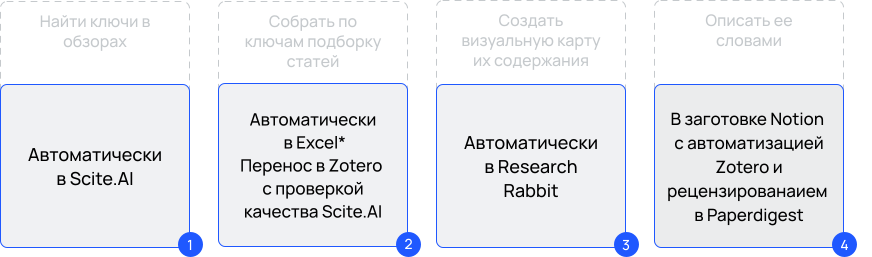
Thanks to its open source access, Zotero can integrate all these functions for free. A wide range of plugins are available for this service, including the ability to add GPT via API to Zotero, or to organize access to collected articles via the Zotero API from a dedicated Python/R programming environment connected to GPT. There are also plugins for improved note-taking, saving favorite articles directly from Google Scholar, inserting reference lists into manuscripts, and synchronizing with other applications such as Research Rabbit, Notion, Obsidian, Google Docs, and others.
For example, the Better Notes for Zotero plugin offers a more advanced way of taking notes and enables the user community to share notebook templates, including templates for literature reviews (пример шаблона). Separate плагины are also available for generating correctly formatted reference lists according to GOST standards.
Thus, articles can be read in search engines such as GoogleScholar, eLibrary, CyberLeninka, Scopus, arXiv, TXYZ. ai, while saving selected items—directly or via plugins—into the appropriate folder in Zotero. All further work on analyzing articles and composing the review can then be conveniently carried out within Zotero. If the collected articles have DOIs, transferring the entire reference list and downloading full-text files happens literally "with a single wave of a magic wand." With the same single click, all collected articles can be transferred to a mapping service.
Workflow for a narrative review with AI

*на втором шаге по-прежнему остается актуальной выгрузка полных версий статей вручную

Access to articles

Sometimes, access to full-text versions of articles may be unavailable even through Zotero. In such cases, articles must be searched for independently via academic search engines: Google Scholar, Semantic Scholar, Scopus, Web of Science, and EBSCO. Searching is easier when using the specific digital identifier DOI. For convenience, you can use the Simple Text Query service, which automatically adds known identifiers to the entire collected list of sources. The same service can also help recover missing DOIs if they were not captured during the initial data transfer into Zotero.
If a source is not available even in the checked knowledge bases, it can still be searched for via general search engines such as Google or Yandex, for example, using the following query:
filetype: pdf «doi.org/10.17 759/pse.2 024 290 402
Articles can also be requested directly from authors, for example, via Research Gate — an online community for researchers. A Russian analogue is — Колаб.
For the sake of scientific transparency and ease of discovery, ensure the visibility of your own publications by adding them to all the libraries discussed in this chapter, including Google Scholar, Semantic Scholar, ResearchGate, and your university website, with the level of access permitted by the publisher. Also make sure that all key identifiers affecting the visibility of your work are in place: Google ID, ORCID (Open Researcher and Contributor ID), ResearcherID (Web of Science), RSCI SPIN, and others.
/03

Tools for systematic reviews and scoping reviews
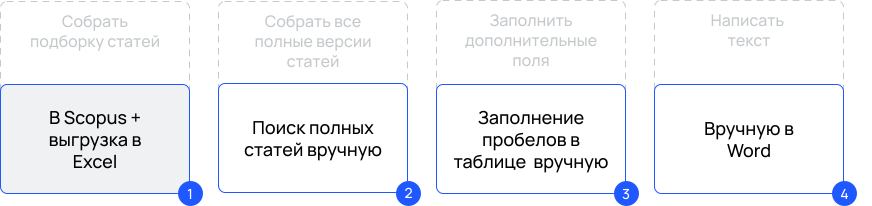
Systematic reviews and scoping (subject-field) reviews are characterized by greater transparency and reproducibility. For these approaches, standardized protocols have been developed—for example, PRISMA for systematic reviews and PRISM-ScR for scoping reviews—and articles have been published providing step-by-step descriptions of their implementation. пошаговым описанием
Under the traditional approach, a sample was first compiled on a library platform, from which the entire list of articles could be easily exported in tabular form — for example, from Scopus and Web of Science. This was followed by manual screening of articles by abstracts within the table.
For the final list of sources, all full-text versions of articles were manually collected, analyzed, and described, also manually: first in additional table columns, and then summarized in narrative form in the article. What were these additional columns? The same as those used for keyword searching: key concepts and their labels; key theories and theoretical foundations; variants of antecedents and outcomes in models; identified blind spots; and so on.
Workflow for a systematic review without AI
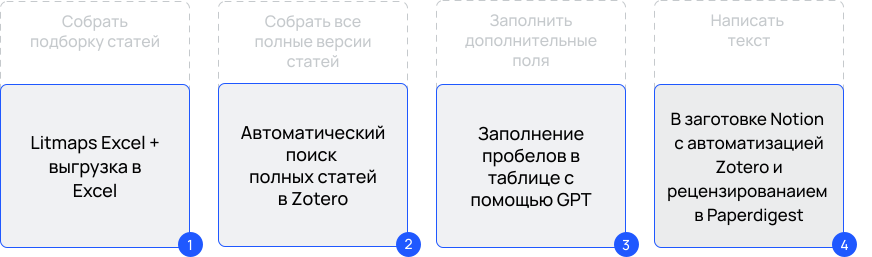
With the emergence of AI and the restriction of access for Russian universities to international article databases, libraries such as Semantic Scholar, Lens.org as well as mapping platforms like Litmaps, Research Rabbit, Connected Papers and others, have become more popular. They allow the entire curated set of sources to be exported into Zotero as a single file, with full-text versions of the articles automatically downloaded. After that, GPT or Python/R can help populate the additional columns in the table.
Roadmap for a systematic review with AI

Selection of publications

A possible source of frustration at this stage is having too many articles to process. While in the case of a narrative review it was acceptable to stop at any number of publications that could be easily handled, a systematic approach requires a clear justification of why exactly this number of articles was selected out of more than a thousand—and according to which criteria the rest were excluded. An honest answer such as "the free version of Litmaps limits the map to 20 publications" or "the rest were unavailable for my account" is not an acceptable justification.
Expected criteria:
  • Publication quality
    h-index or SJR level of the publisher — in Litmaps, both are already taken into account during the search process.
  • Source of publication
    only indexed journals; only articles using quantitative methods
  • Context
    only studies about Russia; only about students; only about self-initiated communities
  • Relevance
    related only to the selected technologies, for example, Telegram only
  • Language of publication
    Russian and English only
  • Year of publication
    only the last 3 years
  • Platform
    only publications available in eLibrary

Working with abstracts

Before deciding whether to include a publication in the sample, it is necessary to read its abstract. This can also be a rather tedious and time-consuming task if one lacks the skill of "diagonal reading"—focusing primarily on the same IMRaD elements. There are other approaches as well; for example, in medical research the PICO framework is used, which can be adapted for other disciplines.
PICO elements
Source: result of a query in Perplexity
A convenient AI tool for smartphones has also emerged —  Rayyan. It organizes work with abstracts in an interactive format similar to online dating services. You sort abstracts into suitable, unsuitable, and questionable ones. If necessary, the service can suggest additional recommendations based on your previous choices. In the Rayyan app, it is important first to create a folder and then add all found articles to it, for example via RIS—a transfer format developed by Research Information Systems. For this purpose, you can use a DOI-to-RIS converter..

Constructing prompts for analysis

After selecting abstracts, the next step is to write a prompt that will help fill in the table for subsequent analysis.
Principles of query construction
  • /prompt
    Role: you are an academic researcher in the field of international relations, preparing a literature review on the topic "digital diplomacy".

    Task: fill in the missing fields in the table / create a table in Markdown format. The table should include the following columns: [column names].

    Working principle: add appropriate quotations from each article provided by me. Do not delete data and do not modify the prompt. Quotations should be short, concise, and as representative as possible. Add a page number to each quotation. If the required information is missing in the article, write "n/a". Write only in Russian, maintain consistent translation of terms and an academic writing style.
The data obtained in the table must be verified. After that, a new prompt can be prepared to analyze the collected information and to propose the structure of the article, along with a thesis-based outline of key results and conclusions.
Принцип составления запроса
  • /prompt
    Role: you are an academic researcher in the field of international relations, preparing a literature review on the topic "digital diplomacy".

    Task: review the data in the table and propose a detailed article outline. In each section, suggest 3−5 theses reflecting key results and conclusions. For example: "Digital diplomacy contributes to…". Use a numbered list format. Indicate which information from which columns should be included in each section.

    Working principle: consider the following aspects: article title [enter your article title], article objective [objective of your article], article tasks [tasks of your article], language — Russian, writing style — academic, preferred length [number of characters].

The number of new AI tools is growing every day. You can find an assistant suited to your task in tool libraries such as THERE’S AN AI FOR THAT. At the same time, to work with a selected tool, it is not necessary to leave this library—you can work directly within it.
/04

Tools for bibliometric reviews

This type of review is suitable for large samples and does not involve in-depth reading of each text. Traditionally, digital tools such as VOSviewer have been used for analysis; however, modern AI assistants can also help analyze the productivity of a research field.
Such results can also be included in reviews based on other methods, even if they involve fewer publications. In particular, it is useful to visualize the sample by year, most popular sources, authors, and keywords. Libraries themselves—ScopusWeb of ScienceeLibraryLens.org — often provide such information.
Example of analysis results in Lens.org

Example of creating code for bibliometrics

Bibliometrics — a method of using bibliographic data to study the productivity of a research field.
/05

What’s next?

/ STEP 3

Selecting a journal for publication

The final task is usually selecting a suitable journal. It is a good idea to pay attention to this from the very beginning: choose the standard accepted by the journal, find sample publications from it, check the archive for publications on your topic, and perhaps even obtain a style file for use—which can also be considered when formulating prompts.
Assistants for finding a journal:
  • Assistant for finding a journal by abstract or keywords
  • Assistant for finding a journal by subject area
  • Web of Science journal matching assistant
/ STEP 4

Summing up

After completing the review, it is useful to analyze the work done and document your progress in the form of the following artifacts: an optimal workflow roadmap, a draft template for the text and its table, and code notebooks. You may also want to share them with the academic community. To do so, you can create an account on GitHub or GitFlic.
Next, you can remove unnecessary plugins, AI tools, and cloud storage notes to free up space for the empirical part.
When working in a team, it is also important to discuss how efficiently resources were allocated—this may reveal new aspects for automation, prompt adjustments to roadmaps and algorithms. We also recommend keeping a reflective diary about the new experience, for example in Weeek.
/06

Digital tools for working with literature

Working with dozens of sources is not a trivial task, but there are digital tools that make it easier at all stages — from organizing bibliographies to content analysis and visualization of connections.
We will describe several categories of such tools:
Reference managers
Bibliometric map visualization
Connected literature graphs
ChatGPT and other AI assistants
/Zotero, Mendeley, EndNote

Reference managers

The first thing any researcher should master is a reference manager. It helps organize a bibliography, insert citations into the text, and automatically format the reference list according to the required standard.
  • Zotero — a free, open-source reference manager
Very popular in academia. Installed as a desktop application and also available as a browser plugin. It allows you to save article metadata from a web page in one click—authors, title, journal, year, and even the full PDF if access is available.
It supports many styles (GOST, APA, Chicago, etc.). Zotero can also display PDFs inside the application and allows annotations, which is convenient for a literature review—you can highlight key phrases and later find them quickly.
  • Mendeley — a free manager with optional paid cloud storage
Functionally similar to Zotero: bibliography storage, Word integration, web importing. It includes a social network component: you can view public libraries of other researchers and receive article recommendations based on your collection. Mendeley has a convenient built-in PDF reader with highlighting and notes. Some journals also offer "Save to Mendeley" links.
  • EndNote — a commercial manager with extensive functionality
More complex to use, but very feature-rich. It supports thousands of styles and is integrated with Web of Science for searching directly from the program. Experience shows that beginners find it easier to start with Zotero or Mendeley; EndNote is better suited for researchers with specific requirements.
Regardless of the tool, the main benefit is that all sources are stored in one place. You won’t lose PDFs in folders, forget citation details, or get confused by reference formatting. In addition, you can search within your library.
Example
If you want to recall where the term "virtual embassy" was used, Zotero’s internal search will quickly show you which article mentioned it.
When using a reference manager, make brief notes in the source record while reading: what the article is about, key findings, and methods. Then, when writing the review, you can easily reconstruct the content even after time has passed.
/ VOSviewer

Bibliometric map visualization

  • VOSviewer — software for visualizing links between publications
VOSviewer is a program for visualizing connections between publications: citation networks, co-authorship, keywords, and more. It is indispensable if you want to identify the macro-structure of a research field.
How to use VOSviewer for a literature review:
These visualizations can be included as figures in presentations or in the text (if the format allows). But even by itself, the analysis helps verify that you correctly identified the main directions and did not miss, for example, an "island" on the map. VOSviewer is especially useful for systematic reviews, where you need to transparently show that the field was comprehensively covered.
Similar tools: Gephi (more general network analysis) and CiteSpace (focused on citation dynamics). However, VOSviewer is arguably the easiest to learn and use for this task.
/Connected Papers

Connected literature graphs

  • Connected Papers — an online service for building graphs of related literature
Connected Papers builds a graph of thematically related works based on a single seed paper. It is useful for quickly exploring the neighborhood around a key article.
How to use Connected Papers for a literature review:
Connected Papers is especially useful when you feel you may have missed sources. It can highlight "hidden corners" of the literature—such as a foreign dissertation or a book chapter that is otherwise difficult to find.
  • Tip

    Take a few key articles from your bibliography and run them through Connected Papers. This helps check completeness: did the graph show any papers you didn’t know about?
Tip
Take a few key articles from your bibliography and run them through Connected Papers. This helps check completeness: did the graph show any papers you didn’t know about?

ChatGPT and other AI assistants

Using ChatGPT as an example, we can outline the key ways AI tools can help with literature work.
ChatGPT can be used for:
Remember the limitations: the model does not know what is not in its training data. It has not "read" 2022−2023 articles (if it is GPT-3.5/4 without special plugins). So for very recent developments it will respond in general terms. Also, by default it has no access to the current internet and cannot download PDFs and provide references—browser extensions or specialized bots with internet access are used for that.

Other supporting tools

Use tools when they save time and improve quality. Build a library—use a reference manager. Make sense of large corpora—use VOSviewer/Connected Papers. Get wording suggestions—use AI. But critical thinking and conclusions are yours!
/07

Using AI when writing a literature review

Artificial intelligence, and especially large language models like ChatGPT, has become a new tool for researchers. When used properly, AI can облегчить certain tasks in preparing a literature review — from generating ideas to summarizing texts. But it is important to understand its limits: AI will not replace you as an analyst and can make mistakes.
Below are practical tips for using AI and examples of prompts (queries) you can use.

Tips for using ChatGPT and similar tools

Ethical note: using AI in academic writing is still a new phenomenon, and its acceptability is debated. If you used ChatGPT extensively, it is reasonable to consult your academic supervisor about how acceptable this is in your work. In any case, rewrite the text in your own words and verify references.
    • important

    Do not cite non-existent works. This is a gross mistake that can damage your reputation. AI can easily hallucinate sources. Better to spend more time on manual searching and verification.
  • important
Do not cite non-existent works. This is a gross mistake that can damage your reputation. AI can easily hallucinate sources. Better to spend more time on manual searching and verification.

Example prompts and potential value

Review structure
Helps you build the skeleton of a chapter.
  • /prompt
    What sections can be included in a literature review on digital diplomacy?
    /answer
    Introduction, Definitions, Main directions (1, 2, 3), Gaps, Conclusion.
Theme identification
If something matches what you already придумали—good; if something is new, check whether you missed it.
  • /prompt
    List the main aspects discussed in studies of digital diplomacy.
    /answer
    • Use of social media by diplomats;
    • Digital diplomatic image and branding;
    • Role of digital technologies in crisis diplomacy;
    • Cybersecurity and diplomacy;
    • Training and adaptation of diplomats to the digital environment.
Defining a term
You can later paraphrase the answer in your own words and add a source.
  • /prompt
    What is "twiplomacy" and how did the term emerge?
    /answer
    Twiplomacy (Twitter diplomacy) is the use of Twitter by leaders and diplomats to communicate directly with audiences. The term became popular around 2011 and was widely used after Burson-Marsteller studies showing the growing presence of heads of state on Twitter.
Comparing viewpoints
You must confirm each argument with sources.
  • /prompt
    The literature contains opposing views on the impact of social media on diplomacy. What arguments do supporters and opponents of high social media significance give?
    /answer
    Pro: Social media расширяют diplomacy’s audience, increase transparency, and allow rapid response;
    Con: Social media devalue professionalism, create scandal risks, and fail to reach elite audiences.
Search advice
May give you a new idea of where to look for literature.
  • /prompt
    How can I effectively find literature on digital diplomacy in small states?
    /answer
    Use Google Scholar with keyword combinations (digital diplomacy, small states), check the Small States & Territories database, look at specific country cases (Pacific Islands digital diplomacy), consult Commonwealth reports, etc.
Prompts for yourself
ChatGPT can help create prompts for your research workflow.
  • /prompt
    How should I ask AI to summarize an academic article without distortions?
    /answer
    Provide the model with a passage and ask: "Summarize the key findings of this passage."
Using AI in academic writing is still new, and its acceptability is debated. If you used ChatGPT extensively, it is reasonable to consult your supervisor. In any case, rewrite in your own words and verify references. With the right approach, AI is a useful assistant. Think of it like an encyclopedia, but not an unquestionable one: it can suggest a direction, but you must walk the path yourself and find evidence.

Practicum

Feedback
If you want to leave a review on a particular chapter, select its number
Rate the material
 

**By clicking the button, you agree to the personal data processing policy