
A collective textbook-guide by Colaboratoria
Network analysis in the study of digital diplomacy

- Denis VakarchukAuthor
In world politics, all actors or events in different parts of the system influence one another. Any actors of world politics that are connected to other actors in one way or another can be represented as nodes and analyzed through network analysis. This method helps to understand how the structure of ties is formed, how this structure determines the behavior of actors, and what place they occupy within it.
/01
Network Analysis As a Method
Network analysis has been used for quite a long time to solve research problems in the social sciences. For the discipline of international relations, this method is also not something new. International relations scholars adapted network analysis for research purposes as early as the 1960s. However, it was in the 2010s that this method gained particular popularity both abroad and in Russian international-political scholarship. This is connected, on the one hand, with the digitalization of international-political reality, and on the other hand—with the international relations itself.
Network analysis in international relations
Regardless of the subject area, the basis for applying network analysis is always a research interest in ties between actors or network nodes. Such nodes may be states, international intergovernmental or non-governmental organizations, individuals, or groups of individuals of interest to the researcher. Connections between actors of world politics can be just as diverse: for example, trade flows, defense agreements, membership in joint international organizations, co-authorship of draft resolutions, or digital interaction. The unit of analysis can be either the network structure as a whole or an individual node—the actor.
Essentially, a researcher using network analysis is interested in understanding how a particular structure of ties is formed, how this structure determines the behavior of actors, what place certain actors occupy within this structure, and why they occupy it. Therefore, to the question "Can network analysis be used to study international relations?" the answer is unequivocally yes.
It is harder to answer the question "How should network analysis be used to study international relations?" This largely depends on a specific research perspective. Ultimately, the choice of one method or another will always be determined by the research methodology.
Analysis of social networks
A rapidly developing segment of international relations scholarship today is the analysis of social networks actively used by states in implementing digital diplomacy. Thus, for most states, conducting digital diplomacy via "Twitter" lies at the heart of a strategy for promoting interests abroad.
The choice of "Twitter" as the main technological platform for digital diplomacy is due to the competitive advantages of this social network:
-
 reaching a significant target audience;
- high speed of information dissemination compared to traditional media and other social networks;
- tracking and assessing public opinion worldwide on particular problems without serious costs.
However, not only states but also international intergovernmental organizations and non-state actors use social networks. Therefore, it is not surprising that more and more scholars turn to social media data when studying world politics.
By interacting via social networks, actors define the channels and boundaries of information flow. Following, liking, retweeting, mentioning, and hashtags are types of Twitter user interactions that are built into networks, forming communities. The structure of such communities linked by political communication is of unquestionable interest to political scientists.
Given the enormous volume of data, researchers often need methods that allow them to structure or filter these data—for example, to identify such communities. One of these methods is network analysis.
/02
Basic concepts of network analysis
As noted earlier, within the methodology of network analysis there are three core concepts:
- node (vertex)
- tie (edge)
- network
Any network consists of many nodes connected to one another by a certain type of social relationship. Nodes are the basic units of analysis. Ties show how nodes are connected. For example, users of "Twitter" can be connected by retweeting one another’s posts. The main assumption here is that a retweet is a measure of a user’s influence, because the more retweets a user’s tweet receives, the more people become familiar with the message.
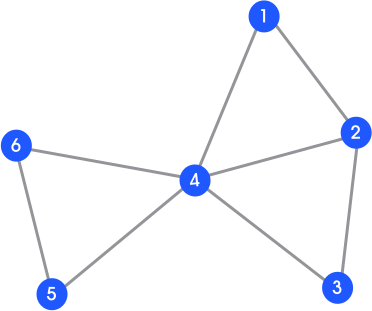
In turn, a network is nothing more than a set of nodes connected by ties. In the figure, nodes are shown as circles, and ties are the lines connecting them. In terms of the previous example, we can imagine that such a network connects six Twitter accounts—for example, diplomatic representatives of the U.S. Department of State. Thus, the network shows that American diplomats interacted with one another through retweets.
At the same time, the number of ties in this network is small and, at first glance, it may seem that the network structure does not allow us to identify the most influential actor. However, the situation changes if we use the concept of centrality, which characterizes the role of each node in the network configuration.
Example of network visualization
The concept of centrality in network analysis
Centrality is the key tool for assessing the influence of network actors. In studies of digital diplomacy, the following are most often used:
- Degree centrality
Degree centrality is measured by the number of direct ties a node has. The more ties a node has, the more influential it is within the structure. High values are typical of actors who actively disseminate content—for example, official accounts official accounts affiliated with the Ministry of Foreign Affairs .
- Betweenness centrality
Betweenness centrality shows a node’s role in transmitting information between communities. That is, a node with a high betweenness value can control interaction between actors in the network. For example, NGOs or media platforms often act as "bridges" between state and non-state actors.
Tabular data clearly demonstrate the variation in actors' influence within a network configuration depending on the selected indicator. Only node 4 is the most influential vertex regardless of the centrality measure. This is due to its controlling position within the network structure. Most communication flows in the network pass through this node. The role of this node is structure-forming for the network under consideration. If communications through this node are disrupted, the unity of the network will collapse.
The table below shows the values of the indicated centrality measures for each node.
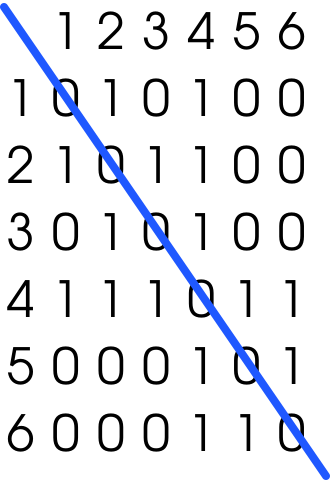
In addition to a graphical image, a network can be represented as an adjacency matrix. Matrix data are presented in binary form: "1" means there is a tie between nodes (in our example—a retweet), "0" indicates the opposite. It is important to note that the diagonal of the matrix is filled with zeros. This means that the matrix under consideration is undirected (symmetric): if node 1 is connected to node 2, then node 2 is connected to node 1, etc.
Adjacency matrix
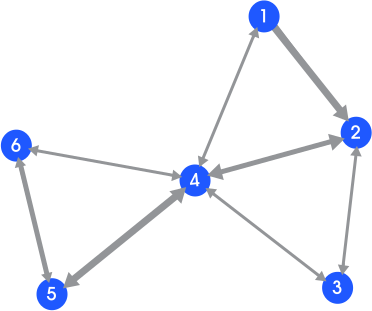
The nature of the data allows us to complicate the network under consideration by adding new parameters: weight and direction of ties. Suppose that, first, American diplomats retweeted their colleagues' posts a certain number of times, and second, diplomat 2 did not retweet diplomat 1's post. If we add this information to the matrix above, the graphical image of the network will change. We will obtain a weighted directed network.
Weighted directed network
/03
Network Analysis in R
Mastering network analysis as a tool for studying digital diplomacy, in addition to theoretical preparation, requires practical skills in working with specialized software. The goal of such research is often to study the structural features of network interactions and the influence of key actors in a digital environment—for example, based on retweets on "Twitter."
To achieve this goal, researchers usually solve a number of tasks:
- build a network model of interactions;
- compute centrality metrics to assess actors' influence;
- identify subgroups (for example, k-cores);
- analyze the relationship between actors' political affiliation and their position in the network;
- visualize the network structure to interpret patterns.
Programming languages such as R and Python have taken a dominant position in processing and analyzing network data. R, in particular, provides a powerful toolkit for solving these tasks, allowing researchers to answer classic research questions: Which network actors play a key role in shaping information flows of digital diplomacy (the network structure)? How does their political affiliation affect this role?
To solve these tasks, the following R packages are usually used:
- igraph
- statnet
- tidygraph
These packages have become de facto standards, making it possible to structure data efficiently, compute metrics, and visualize networks. Each package has its advantages and disadvantages. In this practicum, we will use the capabilities of each of these packages.
/ STEP 1
Preparing the dataset
The specific dataset used in this chapter to demonstrate the capabilities of network analysis contains information about discourse related to China's "Belt and Road" initiative "Twitter" from September 7, 2013 to November 30, 2021. The original dataset provides information on 500,711 messages and 714,794 reposts related to the "Belt and Road" initiative. The dataset was collected via the Twitter API by applying a set of keywords, including hashtags: "belt and road", "one belt one road", "new silk road", "maritime silk road", and "silk road economic belt". The dataset contains four tables: tweets, retweets, users, and potentially unrelated tweets.
In this chapter, using the data containing information about retweets, we identify key actors associated with the "Belt and Road" narrative on "Twitter." The working sample contains 5,000 retweets randomly extracted from the original dataset.
/ STEP 2
Loading packages
It is assumed that the R environment is already installed on your computer. To get started, you also need to install and open the RStudio IDE and load the relevant packages. If the packages are not installed, they should be installed before you begin.
# Loading the packages needed for work
library(igraph)
library(statnet)
library(tidygraph)
library(intergraph)
library(dplyr)
library(openxlsx)
In addition to the packages listed above, the dplyr package will be used for manipulating tabular data; openxlsx will be used to work with .xlsx files; finally, intergraph will be used to convert network objects from statnet format to igraph format and vice versa.
/ STEP 3
Data preparation
The practical implementation of network analysis in R always begins with data preparation. As a rule, the source information is an edge list table, where each row describes a directed tie between a source and a target—for example, one user retweeting another user’s post.
Data are imported via the read.csv () function. After that, the researcher can select the columns relevant for analysis, such as source and target. It is important to note that additional node attributes (in particular, political affiliation) make it possible to deepen the analysis by identifying subgroups within the network.
# Importing data from a CSV file
edges_5000 <- read.csv("retweets_political_5000.csv")
# Selecting the columns needed for work
edges_5000_1 <- edges_5000 %>%
    select(source, target)
Transforming the data into a network object is done using the tidygraph package, which is integrated into the tidyverse ecosystem. This provides convenience in manipulating nodes and edges, as well as the ability to switch between formats: for example, statnet—for calculating network density and other statistical metrics; or igraph—for finding network subgraphs. The as_tbl_graph () function automatically identifies nodes, converting unique source and target values into graph vertices.
# Creating a network object from tabular data
tg_5000 <- as_tbl_graph(edges_5000_1) %>%
  activate(nodes) %>% # Activate the nodes table
  activate(edges)     # Activate the edges table

# Switching to the statnet format for further network analysis
tg_5000 <- intergraph::asNetwork(tg_5000)

# Checking the class of the studied object
class(tg_5000)

# Computing descriptive network statistics, including network density
summary(tg_5000)
The results of summary () and class () show that we successfully created a network object containing 4,768 vertices and 5,853 edges. The created network is directed. The network density equals 0.26. Network density is a parameter ranging from 0 to 1 that indicates the share of existing ties in the network relative to the maximum possible number of ties. That is, the closer the network density is to 1, the higher the interconnectedness of the network.
Centrality in R is computed using the degree () and betweenness () functions, and the results are exported into tables for further interpretation.
# Computing degree and betweenness centrality for each vertex
deg <- degree(tg_5000)
bet <- betweenness(tg_5000)

# Combining the centrality values into a table
df_tg_5000 <- data.frame(deg, bet)

# Switching to igraph format for further network analysis
net_to_graph_5000 <- asIgraph(tg_5000)

# Extracting vertex names and writing them into a separate variable
nodes_name <- vertex_attr(net_to_graph_5000,
   name = "vertex.names", index = V(net_to_graph_5000))

# Adding the variable to the previously created table
df_tg_5000 <- add_column(df_tg_5000, nodes_name, .before = 1)

# Saving the resulting table to the working folder as .xlsx
write.xlsx(df_tg_5000, 'df_tg_5000.xlsx')
/ STEP 4
Filtering and cleaning data
An important stage of network analysis is filtering and cleaning data. This may include removing irrelevant records or filtering by metric values to identify the most active and structurally significant actors. For example, one can set threshold values for "degree centrality" at >= 40 and for "betweenness centrality" at >= 10 000.
# Sorting by descending deg values;
# Filtering by the condition: deg >= 40;
# Selecting only columns containing deg values and node names
deg_1 <- df_tg_5000 %>%
  arrange(desc(deg)) %>%
  filter(deg >= 40) %>%
  select(nodes_name, deg)

# Saving the resulting table to the working folder as .xlsx
write.xlsx(deg_1, 'deg_1.xlsx')
Influence chart of Twitter accounts by "degree centrality"
# Sorting by descending bet values;
# Filtering by the condition: bet >= 10000;
# Selecting only columns containing bet values and node names
bet_1 <- df_tg_5000 %>%
  arrange(desc(bet)) %>%
  filter(bet >= 10000) %>%
  select(nodes_name, bet)

# Saving the resulting table to the working folder as .xlsx
write.xlsx(bet_1, 'bet_1.xlsx')
Influence chart of Twitter accounts by "betweenness centrality"
If we exclude unindexed account types, then among the most influential nodes in our sample by "degree centrality" and "betweenness centrality" are the Twitter accounts of Chinese state media and accounts affiliated with the Chinese government.
/ STEP 5
Visualizing network data
Graphical representation of a network is a key stage in understanding its structure: visualization helps reveal structural features of the network. The standard function for visualizing a network is plot ().
# Visualizing network data
plot(net_to_graph_5000, vertex.label = NA)
Network data visualization
The figure shows a visualization of our network data. Obviously, it is impossible to draw any meaningful conclusions from this figure. Therefore, if you are working with network data containing a large number of nodes, fine-tuning will be required for correct visualization. In other words, the purpose of graphical representation is to build a figure that demonstrates the important information contained in the network data.
To do this, it is necessary to configure each element of the graphical display, because, like any other type of graphic information, a network visualization consists of many elements: node color, node size, edge color, edge size, layout of the network structure, etc. The capabilities of igraph and statnet make it possible to configure each such element.
# Saving a network layout option into a separate variable
lo <- layout_with_kk(net_to_graph_5000)

# Setting up network visualization
plot(net_to_graph_5000,
vertex.size= log(deg),       # Node size proportional to log(degree)
vertex.label = NA,           # Node names will not be displayed
vertex.color = deg,          # Node color tied to degree centrality
edge.arrow.size = .25,       # Edge arrow size
layout=lo*1)                 # Kamada–Kawai layout minimizes edge crossings
Network visualization after layout tuning
Despite tuning the visualization, it is still very difficult to draw any meaningful conclusions from the updated figure. This problem can be solved via filtering. Since degree centrality has been computed for the nodes in our network, we can use the following code to visualize the most central nodes.
# Filtering the network based on degree centrality values >= 40
filtr_net_to_graph_5000_deg <- get.inducedSubgraph(tg_5000, which(deg >= 40))

# Switching to igraph format for further analysis
net_to_graph_5000_deg <- asIgraph(filtr_net_to_graph_5000_deg)

# Saving a layout option for the filtered network
lo_deg <- layout_with_kk(net_to_graph_5000_deg)

# Loading the table with vertex attributes
deg_1_at <- read.xlsx("deg_1_at.xlsx")

# Visualizing the filtered network
my_pal <- brewer.pal(5, "Dark2")
rolecat <- as.factor(deg_1_at$type)
plot(net_to_graph_5000_deg, vertex.size= log(deg),
    edge.arrow.width = .25,
    edge.arrow.size = .25,
    layout = lo_deg*1,
    vertex.color = my_pal[rolecat],
    vertex.label = deg_1_at[,3],
    asp = 0.35)
Network visualization after filtering
/ STEP 6
k-core analysis
In addition to analyzing network actors and visualizing results in R, it is also possible to study subgroups within large social networks. For this, k-core analysis can be used. A k-core is a subgraph in which each vertex is connected to at least k vertices within that same subgraph. Therefore, k-core analysis is used to find subgroups that fully depend on the structure of internal ties. At the same time, k-cores are nested within one another and do not overlap, so they are easy to identify visually. Thus, k-core analysis makes it possible to identify subgroups with the maximum density of ties.
To identify k-cores, you need to use the graph.coreness () function from the igraph package. This function computes, for each vertex, the core with the maximum k value to which it belongs. After running the code, we find that k varies from 1 to 22 cores in our data. For better interpretation, the result can be visualized. First, it is necessary to assign labels to each node and choose different colors for each k-core.
# Determining the k-core structure of the network
coreness_5000 <- graph.coreness(net_to_graph_5000)
table(coreness_5000)
maxcoreness <- max(coreness_5000)

# Assigning labels, selecting colors, and visualizing the k-core structure
Vname <- vertex_attr(net_to_graph_5000, name = "vertex.names",
    index = V(net_to_graph_5000))
V(net_to_graph_5000)$name <- Vname
V(net_to_graph_5000)$color <- coreness_5000
plot(net_to_graph_5000, vertex.label = NA,
    edge.arrow.width = 0.25,
    edge.arrow.size = 0.25, layout=lo*1,
    vertex.size = 1.0, asp = 0.35)
Visualization of the k-core structure of the network
At the first stage after running the code, we will get a not very informative graph. The reason is that most network nodes (3,981) belong to the first core. Nodes in this core are relatively weakly connected to one another, so they can be excluded for a better graphical display of higher-order k-cores. For this, we set the k-core filtering parameter at >=10. Consequently, cores that do not meet the condition will be excluded from the visualization.
# Removing k-cores that do not meet the specified condition
net_to_graph_5000_10_22 <- induced.subgraph(net_to_graph_5000,
     vids = which(coreness_5000 >= 10))

# Visualizing the filtering result
V(net_to_graph_5000)$color <- coreness_5000
V(net_to_graph_5000)$name <- coreness_5000

plot(net_to_graph_5000_10_22, layout = lo[which(coreness_5000 >= 10),],
    edge.arrow.width = 0.25,
    edge.arrow.size = 0.1, asp = 0.35,
    vertex.size= 3.0, vertex.label = deg_1_at[,3],
    vertex.label.cex = 0.6,
    main = "Graphical display of the filtered k-core network structure")
Visualization of the filtered k-core structure of the network
Analyzing the composition of actors in the obtained k-cores does not allow us to claim that certain actor types dominate the densest parts of the network. This means that, on the sample data, as at a first glance, we cannot conclude that there is any regularity in how subgroups form in the network. As noted above, k-cores have a nested structure. Therefore, for a deeper study of the network structure, one can examine individual subgroups in detail by removing lower-order k-cores. However, such a task goes beyond the format of a textbook.
/04
Limitations of Network Analysis as a Method
Network analysis has established itself in political science as a powerful tool for identifying and visualizing structural patterns of interactions that are inaccessible to other methods. However, its heuristic value is revealed only within mixed research designs, through triangulation with qualitative methods: content analysis, case studies.
Key challenges faced by a researcher using network analysis:
- Accounting for the dynamics of the studied processes;
- Ensuring data validity and completeness;
- Theoretically grounded interpretation of metrics with consideration of network structure and the studied context;
- Awareness of inevitable research abstraction and assumptions when operationalizing complex political phenomena.
Overcoming these limitations requires understanding both the capabilities and the assumptions of network analysis as a method. A common pitfall for many beginner researchers fall into is an excessive focus on network visualization. The placement of nodes in a graph often depends on the layout algorithm and carries no substantive meaning unless this is explicitly specified. What must be interpreted are the metrics and the structure—not only a "pretty picture."
Thus, a network is not a mirror of objective reality, but a model constructed by the researcher—an analytical tool whose effectiveness directly depends on theoretical preparation, methodological rigour, and the researcher’s critical thinking.
The material in this chapter does not claim to be exhaustive. Many important aspects of network analysis methodology remain beyond its scope, such as affiliation networks, dynamic network models, and community-detection algorithms. Nevertheless, mastering this chapter will help you use the R programming language to implement basic research tasks in the field of digital diplomacy—from building a network to testing hypotheses about influence and interaction structure.
Practicum
- What is network analysis, and why did it become especially popular in international relations research since the 2010s?
- What types of nodes and ties may be of interest to an international relations researcher using network analysis?
- Define the concepts: node (vertex), tie (edge), network.
- What is an adjacency matrix and how does it represent network structure? How does a graphical representation of an undirected and directed network differ? A weighted network?
- Explain the concept of k-core analysis. What information about network structure does it provide?
- List the limitations a researcher faces when using network analysis.
- Explain the thesis: "A network is not a mirror of objective reality, but a model constructed by the researcher."
- Borgatti S. P. et al. Network analysis in the social sciences // Science. — 2009. — Т. 323. — №. 5916. — С. 892−895.
- Cao X. Networks of intergovernmental organizations and convergence in domestic economic policies // International Studies Quarterly. — 2009. — Т. 53. — №. 4. — С. 1095−1130.
- Gade E. K., Hafez M. M., Gabbay M. Fratricide in rebel movements: A network analysis of Syrian militant infighting // Journal of Peace Research. — 2019. — Т. 56. — №. 3. — С. 321−335.
- Hafner-Burton E. M., Kahler M., Montgomery A. H. Network analysis for international relations // International organization. — 2009. — Т. 63. — №. 3. — С. 559−592.
- Haman M. The use of Twitter by state leaders and its impact on the public during the COVID-19 pandemic //Heliyon. — 2020. — Т. 6. — №. 11.
- Huang Z. A., Wang R. Building a network to "tell China stories well": Chinese diplomatic communication strategies on Twitter // International Journal of Communication. — 2019. — Т. 13. — С. 2984−3007.; Ingenhoff D., Calamai G., Sevin E. Key influencers in public diplomacy 2.0: A country-based social network analysis // Social Media+ Society. — 2021. — Т. 7. — №. 1. — С. 2 056 305 120 981 053.
- Kinne B. J., Bunte J. B. Guns or money? Defense co-operation and bilateral lending as coevolving networks // British Journal of Political Science. — 2020. — Т. 50. — №. 3. — С. 1067−1088.
- Klausen J. Tweeting the Jihad: Social media networks of Western foreign fighters in Syria and Iraq //Studies in Conflict & Terrorism. — 2015. — Т. 38. — №. 1. — С. 1−22.
- Man C.-Y., Palmer D. A., Qian J. The Belt and Road Initiative on Twitter: An annotated dataset // Data in Brief. 2022. Vol. 45. Article 108 711. https://doi.org/10.1016/j.dib.2022.108 711
- R Core Team. igraph: Network analysis and visualization [Электронный ресурс]. r.igraph.org (дата обращения: 01.05.2025).
- Statnet Development Team. statnet: Software tools for the Statistical Analysis of Network Data [Электронный ресурс]. https://statnet.org (дата обращения: 01.05.2025).
- Tidygraph [Электронный ресурс]. https://tidygraph.data-imaginist.com (дата обращения: 01.05.2025).
- Vitali S., Glattfelder J. B., Battiston S. The network of global corporate control // PloS one. — 2011. — Т. 6. — №. 10.
- Zaiotti R., Bjola C. (ed.). Digital diplomacy and international organisations: autonomy, legitimacy and contestation. — Routledge, 2021.
- Vakarchuk D. O. Features of U.S. and PRC digital diplomacy in the Mediterranean region // Vestnik of Saint Petersburg University. International Relations. 2025. Vol. 17, No. 4. pp. 411−430.
- Vakarchuk D. O. The development of integration in the post-Soviet space: a network analysis case // Political Design in the Space of Social Communications. Thirty years without the USSR: political institutions and international-political practices in the post-Soviet space: materials of the XIII International Scientific Conference, Moscow, May 21, 2021 / Ministry of Science and Higher Education of Russia, RSUH, RAPS. — Moscow: Without publisher, 2021. — pp. 200−208.
- Vakarchuk D. O., Borovinsky A. V. Cohesion of developing countries in the UN General Assembly: quantitative analysis of co-authorship and voting networks on resolutions // Russia and the Modern World. — 2024. — No. 1(122). — pp. 195−205.
- Degterev D. A. Network analysis of international relations // Vestnik of Saint Petersburg University. International Relations. — 2015. — No. 4. — pp. 119−138.
- Aaron Clauset, Ellen Tucker и Matthias Sainz, The Colorado Index of Complex Networks — портал содержит наборы данных для сетевого анализа по всем областям науки, включая политологию;
- Igraphdata package — пакет, содержащий коллекцию различных наборов данных для использования вместе с пакетом «igraph».
- Kaggle — портал, в том числе содержащий наборы данных, для сетевого анализа по всем областям науки, включая политологию